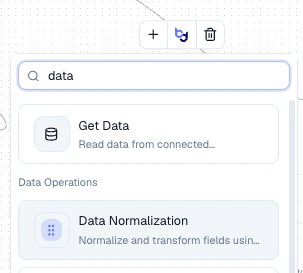
Agents are built by chaining nodes together in a visual workflow. Each node performs a specific operation — fetching data, transforming fields, detecting duplicates, enriching with AI, or taking action. Click + on any node to open the node picker and search for the one you need.

Node Categories

Data

Fetch records from connected integrations

Combine

Join, merge, or union datasets together

Filter

Narrow records by field conditions

Condition & Flow

Branch your workflow based on conditions

Transform

Reshape, aggregate, sort, and clean data

Enrichment & Lookup

Enrich records with AI, web search, or lookups

Query & Code

Run SQL queries or custom code

Actions

Create, update, export, or notify

Utility

Annotations and workflow helpers

All Nodes

NodeCategoryDescription
Get DataDataFetch records from a connected integration
BondCombineCreate relationships between entities using shared keys
MergeCombineJoin two datasets side-by-side into a flattened table
UnionCombineStack rows from two datasets vertically
Simple FilterFilterFilter records by field conditions with AND/OR logic
Or FilterFilterCombine multiple filter conditions with OR logic
Basic ConditionConditionBranch the workflow based on a simple true/false condition
Field Comparison ConditionConditionBranch based on comparing field values
Router ConditionConditionRoute records to different paths based on multiple conditions
Data NormalizationTransformUse an LLM to clean and standardize field values
TransformTransformApply rule-based transformations to fields
AggregationTransformCompute summary statistics across records
SortTransformOrder records by field values
Group ByTransformGroup records by field values
Split GroupTransformSplit grouped records back into individual rows
Head/TailTransformTake the first or last N records
Regex PatternTransformExtract or replace text using regular expressions
AI EnrichmentEnrichmentSend records through an LLM prompt to generate new fields
Find DuplicatesEnrichmentDetect duplicates with fuzzy matching and configurable thresholds
Web SearchEnrichmentSearch the web for each record using Exa
Dictionary LookupEnrichmentMap field values using a lookup dictionary
Reference LookupEnrichmentLook up values from a reference dataset
Synccentric LookupEnrichmentLook up records in Synccentric
QueryQueryRun SQL queries against your data
Code ExecutionCodeRun custom code to transform or process records
Update RecordActionsWrite values back to records in a connected integration
Create RecordActionsCreate new records in a connected system
Export to CSVActionsExport data to a CSV file or Google Sheet
Private ExportActionsExport records to a downloadable file
Send EmailActionsSend email notifications via SendGrid
HTTP RequestActionsCall an external API
SlackActionsPost notifications to a Slack channel
TeamsActionsPost notifications to Microsoft Teams
Upload FileActionsUpload files to cloud storage
Sticky NoteUtilityAdd annotations to your workflow canvas