

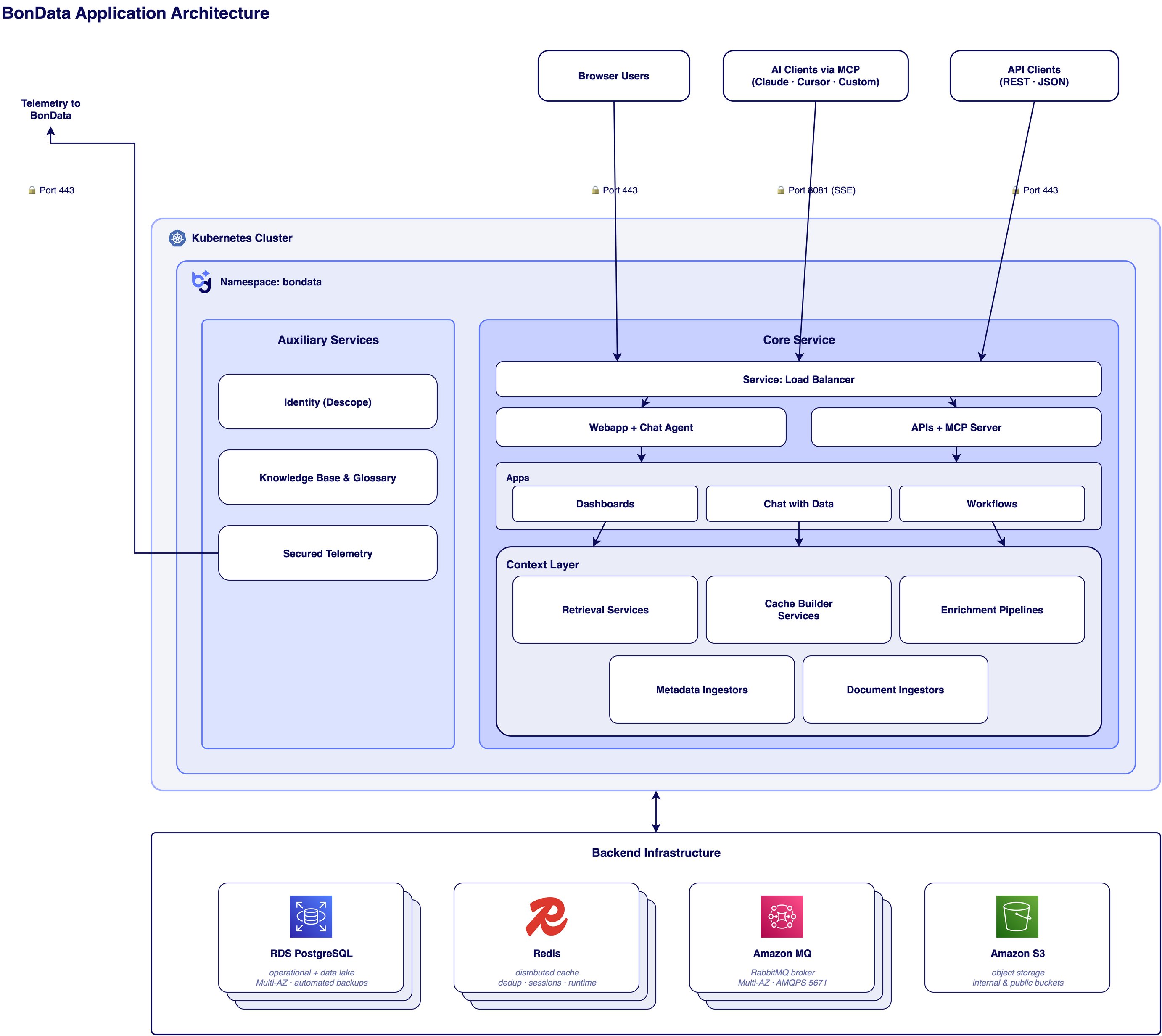
BonData, logical application architecture
Workflow overview
A user signs in through one of the access-layer surfaces, typically the webapp, where they build and run agents, browse the connected data warehouse, and chat with the AI assistant. The webapp talks to the user-facing API. The API authenticates the request, resolves the caller to a tenant, and either serves a synchronous response from the operational database or enqueues an asynchronous job on the message broker. When an agent runs, a workflow runner picks up the job and walks the agent’s node graph in topological order. Data nodes pull records from connected integrations; transform and filter nodes run in-memory; enrichment nodes call AI providers or run generated code in a sandboxed microVM; action nodes write back to integrations or deliver notifications. Each step is logged with a tenant identifier and a request ID so the entire run can be traced end-to-end. The same workflow engine powers the chat agent, which uses the MCP server to expose BonData’s tool surface to an LLM, so a user can ask the assistant to run an agent, query the data warehouse, or take an action, and the same authorization and tenancy rules apply.Chat agent guardrails
The chat agent inherits the calling user’s identity end-to-end: every tool invocation runs under the user’s tenant, role, and integration scopes, and is subject to the same authorization checks as a direct API call. The agent cannot access data or invoke integrations the user is not already entitled to. Sensitive actions surface a confirmation step in the chat UI before they execute. All agent activity is logged with the same request ID, tenant, and user attribution as the rest of the platform (see Audit logging).Core components
BonData is organized into three layers, an access layer, an application layer, and a data and messaging layer.Access layer
External traffic reaches BonData through Cloudflare, which provides DNS, TLS termination, web-application firewall rules, and DDoS protection at the edge. From Cloudflare, traffic is forwarded to an AWS Application Load Balancer, which terminates a second TLS hop using a certificate from AWS Certificate Manager and routes to services running in the cluster. For deployments that cannot accept inbound traffic at all, the Cloudflare Tunnel controller dials outbound from the cluster and Cloudflare brings traffic over the tunnel.Application layer
The application layer runs on Amazon EKS with workloads in private subnets across three availability zones. It is composed of:- API services. A user-facing FastAPI service, a separate management API, and an MCP server that exposes BonData’s tool surface to AI clients over the Model Context Protocol with Server-Sent Events for streaming.
- Web applications. A user-facing React webapp built with Vite, an administrative webapp, and a chat-agent service that uses the Anthropic SDK and acts as an MCP client.
- Workflow engine. Workflows are graphs of nodes (data fetch, filter, transform, enrichment, action). When a workflow runs, the API enqueues a job on the broker and a workflow runner picks it up.
- Asynchronous runners. Two kinds of pod do most of the heavy work. Queue consumers subscribe to the broker and execute workflow jobs, integration syncs, and data refinement. Scheduled runners run on intervals, refreshing integration credentials, monitoring integration health, delivering notifications, aggregating data quality, and reconciling state.
- Sandboxed code execution. When a workflow needs to run generated code, the code-execution node sends the generated code and the input variables the workflow node passes (not the full workflow state) to e2b Code Interpreter, where it executes in an ephemeral Firecracker microVM hosted in the United States. Each sandbox is kernel-isolated and destroyed at the end of the execution. Network access from inside the sandbox depends on the workflow’s configuration. e2b maintains its own compliance posture at trust.e2b.dev, which customers can review as part of their vendor due diligence.
Data and messaging layer
State is held in a small set of managed AWS services and one in-cluster cache:
Job payloads on the broker are typically small references (record IDs, S3 keys) rather than the records themselves; the records are read on demand from RDS or S3.
AI providers
The default LLM is Anthropic Claude. Workflows can be configured to use Google Gemini or OpenAI models. All model calls are HTTPS egress; no model-provider component is deployed in the cluster. Anthropic, Google, and OpenAI API usage is governed by each provider’s commercial terms, which prohibit using customer inputs and outputs for model training.Embeddings
Two embedding options are supported:- OpenAI
text-embedding-3-small(default). Used in Cloud SaaS and as the default in Cloud-Prem. HTTPS egress to OpenAI; not used for training under OpenAI’s commercial API terms. - AWS Bedrock Titan Embeddings (enterprise packages only). Runs inside the customer’s AWS region in their Cloud-Prem deployment, so the embedding call never leaves the customer’s AWS account. Available on enterprise-tier engagements; selected at deployment time.
Identity
Identity is provided by Descope, with separate Descope projects for the user-facing application and the management application. SSO over SAML or OIDC, MFA, and session controls are configured in Descope. Applications validate Descope-issued JWTs locally on every request. See Authentication.Secrets
All credentials and application-layer encryption keys are stored in AWS Secrets Manager and synced into the cluster by the External Secrets Operator. No long-lived AWS keys live in the cluster, in CI, or in the codebase. See Secrets management.Observability
See Audit logging for what is captured and where it lives.