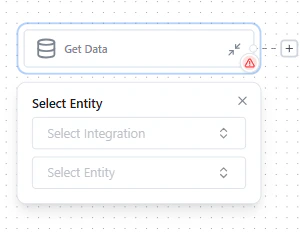
Agents are automated workflows that monitor your data, evaluate conditions, and take action across connected systems. They replace manual data tasks with reliable, repeatable automation.
Monitor data changes and trigger actions in real time.Examples: Notify accounting about overdue invoices. Prioritize support tickets from low-NPS accounts. Escalate cases that exceed SLA.
Move data between systems with field mapping.Examples: Import Salesforce accounts from a CSV. Migrate closed HubSpot deals to Salesforce. Sync CRM data with your warehouse.
Identify and resolve data inconsistencies.Examples: Find contacts without email addresses. Detect mismatched records across CRMs. Track data completeness thresholds.
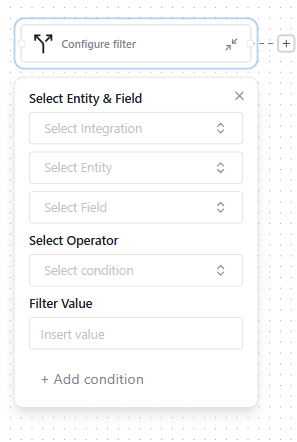
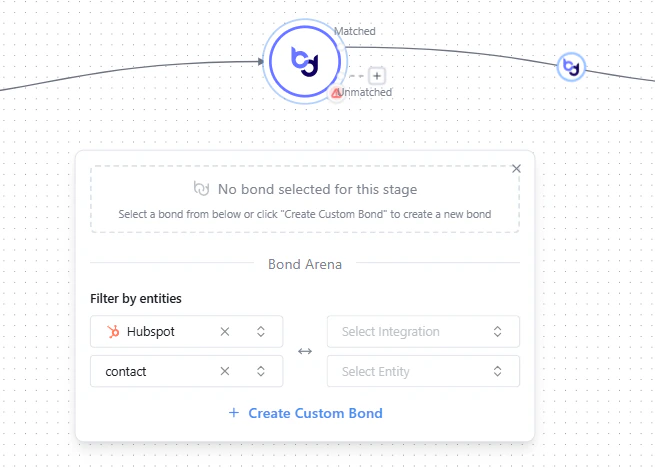
Define conditions that identify records needing action. If your filter references a different integration than your data source, a Bond node appears automatically to link the systems.
Configuring a filter with conditions
3
Action node
Choose what happens when conditions are met - create records, update fields, send notifications, or generate exports.
Setting up an action node
4
Save, Test, and Run
Save - persist your changes
Test - simulate the Agent without triggering live actions