

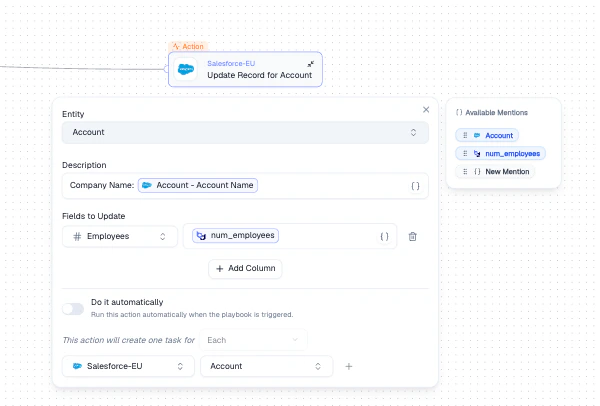
Update Record node - entity, description, and field mapping with Mentions
Configuration
How It Works
1
Select the target entity
Choose which entity’s records to update in the connected integration.
2
Map fields
Use + Add Column to add field mappings. For each field, select the target field and use Mentions to set the value from upstream data.
3
Set execution mode
Toggle Do it automatically to execute immediately, or leave it off to queue tasks for manual approval.
Output
Each matched record creates one task. Tasks are visible in the Agent’s task log after execution.Best Practices
- Start with manual approval to verify updates before enabling automatic execution
- Use a clear Description with Mentions so task logs are easy to scan
- Map only the fields that need updating - avoid overwriting unchanged data
Related Nodes
- Create Record - creates new records instead of updating existing ones
- Get Data - fetches the records that Update Record will modify