

View your entities
- Go to Data > Integrations in the sidebar
- Click on any connected integration
- The left panel lists all active entities
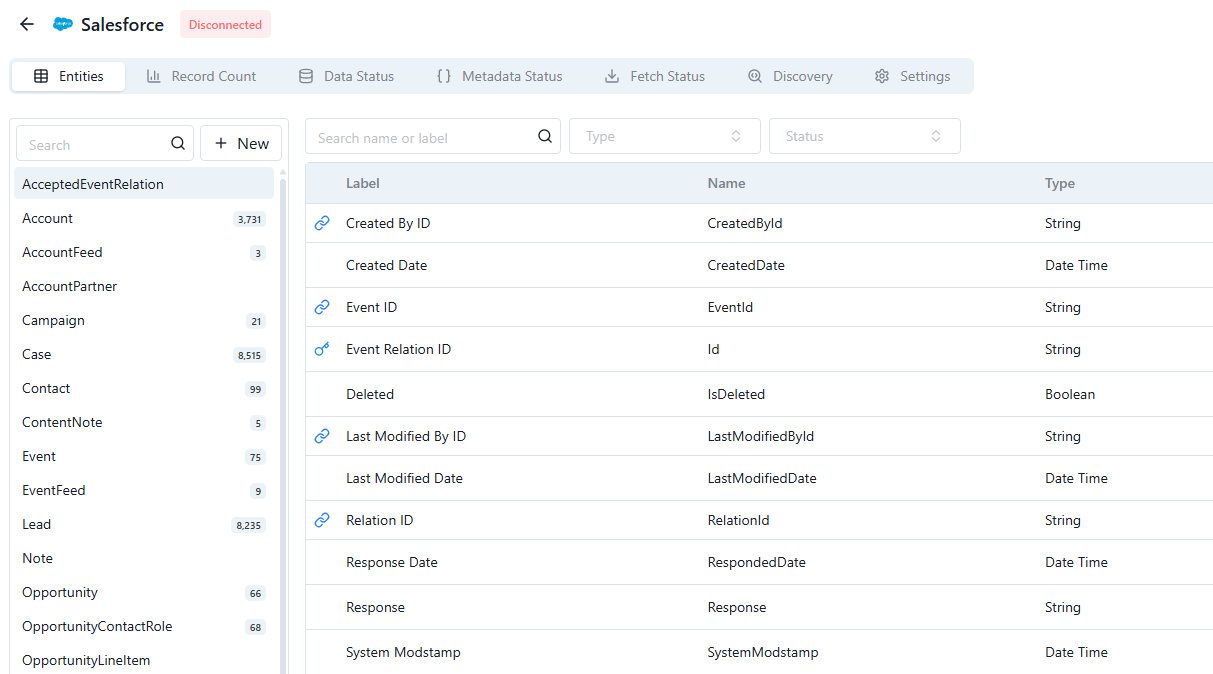
Entity list for a connected integration
Add entities
SaaS integrations
Standard objects (e.g., Salesforce Accounts, Contacts) are included by default. To add custom objects:- Click New at the top of the entity list
- Search for the object
- Click Add
Databases, CSVs, and sheets
Each entity requires a primary key. BonData auto-detects fields that are both available across all rows and unique. You can combine multiple fields into a composite key (e.g., First Name + Last Name + Company).Activation time
After adding an entity, BonData fetches its metadata. This typically completes within 15 minutes, after which the entity is fully available for use in Bonds and Agents.Best practices
- Review periodically - Remove entities you no longer need to keep things clean
- Be selective - Only add entities relevant to your workflows
- Check permissions - Ensure your integration credentials have access to the entities you’re adding