

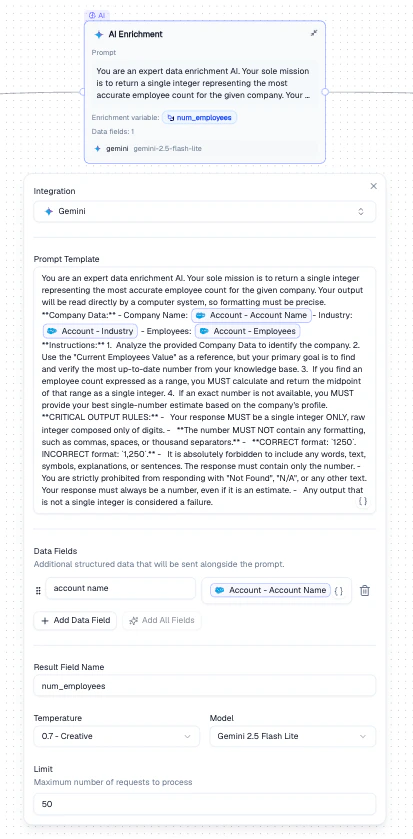
AI Enrichment node - prompt template, data fields, and model configuration
Configuration
How It Works
1
Configure the LLM
Choose a provider, model, and temperature setting.
2
Write a prompt template
Write the instruction for the LLM. Use Mentions to inject record values (e.g.,
{{Account Name}}, {{Industry}}).3
Name the result field
Choose a name for the output field where the LLM’s response will be stored.
Output
A new field (named by Result Field Name) is added to each record containing the LLM’s response. This field becomes available as a Mention in all downstream nodes.Example
Enrich Salesforce Accounts with employee count estimates:- Set the prompt to instruct the LLM to return an employee count
- Use Mentions to pass
Account Name,Industry, andEmployeesas context - Set the result field to
num_employees - The enriched field becomes available as a Mention in downstream nodes
Best Practices
- Be specific in your prompt template - vague prompts produce inconsistent results
- Use low temperature (0–0.2) for factual extraction, higher for creative tasks
- Set a Limit when testing to avoid processing the entire dataset
- Include relevant context fields in Data Fields to improve LLM accuracy
Related Nodes
- Data Normalization - uses an LLM to clean existing fields rather than generating new ones
- Web Search - enriches records with live web data instead of LLM-generated content