

What is a Bond?
A Bond creates a relationship between two entities by matching fields that represent the same identifier. It:- Connects two entities (e.g., Subscriptions and Charge Stations)
- Matches them using a shared field (e.g., Charge Station ID)
- Produces a virtual, in-memory table combining both datasets
Core Concept: Matched vs Unmatched
When a Bond runs, every record falls into one of two categories:- Matched - records where a relationship was successfully found
- Unmatched - records where no corresponding match exists
How It Works
In the UI:- Select two entities:
- Source (left): e.g., Subscriptions
- Destination (right): e.g., Charge Stations
- Define the relationship:
Subscriptions.Charge Station ID↔Charge Stations.Charge Station ID
- The Bond evaluates all records and splits them into:
- Matched pairs
- Unmatched records (from either side)
If you are not seeing the Bond you are after, you can create it by clicking + Create Custom Bond.
Create Custom Bond button
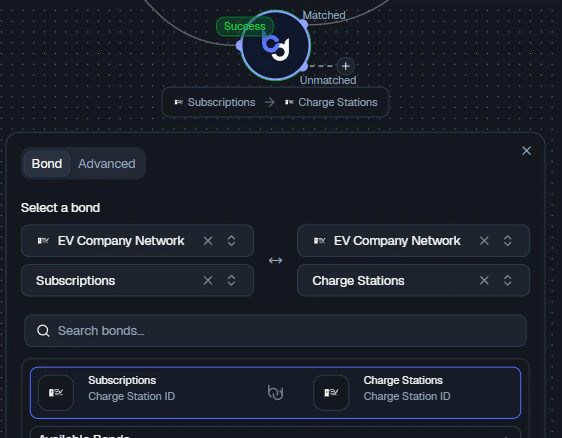
Bond node configuration - selecting entities and match fields
Bond Outputs
The Bond node exposes multiple outputs:- Matched → records that successfully joined
- Unmatched → records that did not find a match

Bond node showing Matched and Unmatched outputs
- Continue analysis on valid relationships
- Investigate missing or inconsistent data separately
Advanced: Controlling Match Behavior
In the Advanced tab, you can define exactly how matched and unmatched records are handled.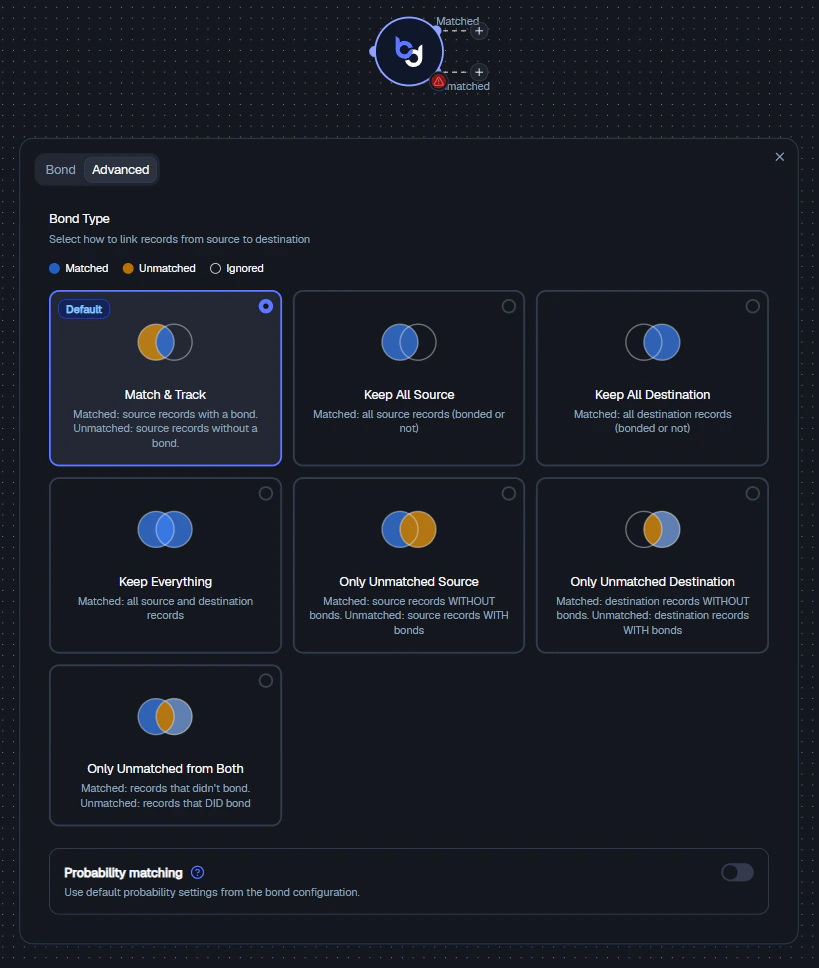
Bond node - advanced match behavior options
1. Match & Track (Default)
- Matched: Source records with a bond
- Unmatched: Source records without a bond
2. Keep All Source
Keeps all source records, regardless of match. Destination data is added when available. Equivalent to a Left Join in SQL.3. Keep All Destination
Keeps all destination records, regardless of match. Equivalent to a Right Join in SQL.4. Keep Everything
Keeps all records from both sides. Equivalent to a Full Outer Join in SQL.5. Only Unmatched Source
Returns source records without matches. Useful for finding missing relationships and data quality checks.6. Only Unmatched Destination
Returns destination records without matches. Useful for identifying unused or orphaned entities.7. Only Unmatched from Both
Focuses strictly on mismatches - records that failed to bond across both sides. Best for debugging joins and auditing data consistency.When to Use Each Mode
Probability Matching (Optional)
The Probability Matching toggle allows the Bond to use probabilistic logic:- Instead of exact matches, it can match records based on similarity using scoring thresholds
- Useful for fuzzy matching (e.g., names, partial IDs) and imperfect or inconsistent datasets
- If disabled, only exact matches are considered
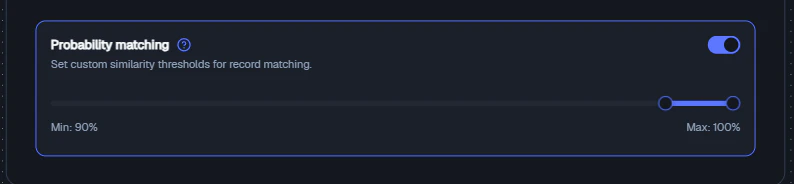
Probability matching - custom similarity thresholds for record matching
Example
Scenario
You want to enrich subscriptions with charge station data.Configuration
- Source: Subscriptions
- Destination: Charge Stations
- Match: Charge Station ID
Result
- Matched output: Subscriptions with valid charge station info
- Unmatched output: Subscriptions missing or referencing invalid stations
Best Practices
- Use Matched output for primary workflows
- Use Unmatched output for debugging and QA
- Choose join behavior intentionally - don’t default blindly
- Validate key fields (IDs should align in format and meaning)
- Use probability matching only when necessary
Related Nodes
- Merge Node - joins two datasets side-by-side into a flattened table, rather than creating entity relationships
- Union Node - stacks rows vertically instead of combining columns