> ## Documentation Index
> Fetch the complete documentation index at: https://docs.bondata.ai/llms.txt
> Use this file to discover all available pages before exploring further.
# Data Normalization
> Use an LLM to clean, standardize, and transform field values
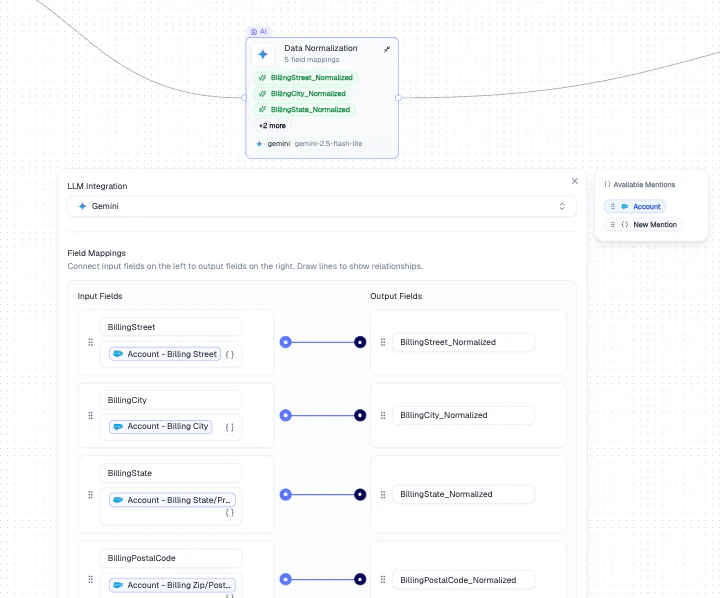
Uses an LLM to normalize and transform field values. Ideal for cleaning messy data - standardizing addresses, formatting names, converting units, or restructuring free-text fields.
 ## Configuration
| Setting | Description |
| ------------------- | -------------------------------------------------------------------------------------------------- |
| **LLM Integration** | The AI provider to use (e.g., Gemini, OpenAI, Anthropic) |
| **Field Mappings** | Connect input fields on the left to output fields on the right. Draw lines to define relationships |
## How It Works
Select the fields from your data that need normalization (e.g., `BillingStreet`, `BillingCity`).
Map each input to a normalized output field (e.g., `BillingStreet_Normalized`).
The LLM processes each record and writes cleaned values to the output fields.
## Output
Normalized output fields become available as **Mentions** in all downstream nodes.
## Example
Standardize addresses across a Salesforce Account dataset:
1. Map `BillingStreet`, `BillingCity`, `BillingState` as inputs
2. Create normalized output fields for each
3. The LLM cleans formatting inconsistencies (e.g., "123 Main St." → "123 Main Street")
## Best Practices
* Use specific, descriptive output field names to avoid confusion downstream
* Test with a small batch first to verify the LLM produces the expected format
* Choose the right LLM - faster models for simple formatting, stronger models for complex transformations
## Related Nodes
* **[AI Enrichment](/guide/nodes/enrichment/ai-enrichment-node)** - uses an LLM prompt to generate new data rather than cleaning existing fields
* **[Transform](/guide/nodes/transform/transform-node)** - applies rule-based transformations without an LLM
* **[Regex Pattern](/guide/nodes/transform/regex-pattern-node)** - extracts or replaces text using regular expressions
## Configuration
| Setting | Description |
| ------------------- | -------------------------------------------------------------------------------------------------- |
| **LLM Integration** | The AI provider to use (e.g., Gemini, OpenAI, Anthropic) |
| **Field Mappings** | Connect input fields on the left to output fields on the right. Draw lines to define relationships |
## How It Works
Select the fields from your data that need normalization (e.g., `BillingStreet`, `BillingCity`).
Map each input to a normalized output field (e.g., `BillingStreet_Normalized`).
The LLM processes each record and writes cleaned values to the output fields.
## Output
Normalized output fields become available as **Mentions** in all downstream nodes.
## Example
Standardize addresses across a Salesforce Account dataset:
1. Map `BillingStreet`, `BillingCity`, `BillingState` as inputs
2. Create normalized output fields for each
3. The LLM cleans formatting inconsistencies (e.g., "123 Main St." → "123 Main Street")
## Best Practices
* Use specific, descriptive output field names to avoid confusion downstream
* Test with a small batch first to verify the LLM produces the expected format
* Choose the right LLM - faster models for simple formatting, stronger models for complex transformations
## Related Nodes
* **[AI Enrichment](/guide/nodes/enrichment/ai-enrichment-node)** - uses an LLM prompt to generate new data rather than cleaning existing fields
* **[Transform](/guide/nodes/transform/transform-node)** - applies rule-based transformations without an LLM
* **[Regex Pattern](/guide/nodes/transform/regex-pattern-node)** - extracts or replaces text using regular expressions