> ## Documentation Index
> Fetch the complete documentation index at: https://docs.bondata.ai/llms.txt
> Use this file to discover all available pages before exploring further.
# Web Search
> Search the web for each record and store results as a new field
Performs a web search for each record using Exa and stores the results as a new field. Use it to find company websites, news articles, LinkedIn profiles, or any public information.
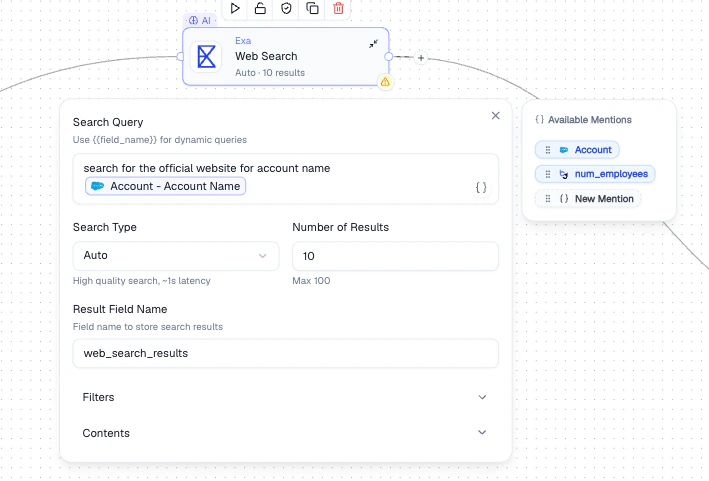 ## Configuration
| Setting | Description |
| --------------------- | ------------------------------------------------------------------------------------ |
| **Search Query** | The search query. Use `{{field_name}}` or **Mentions** to make it dynamic per record |
| **Search Type** | **Auto** (high quality, \~1s latency), **Keyword**, or **Neural** |
| **Number of Results** | How many results to return per query (max 100) |
| **Result Field Name** | The field name where search results are stored |
| **Filters** | Narrow results by domain, date, or other criteria |
| **Contents** | Control what's extracted from each result |
## How It Works
Compose the query using **Mentions** to make it dynamic per record (e.g., `{{Company Name}} official website`).
Select **Auto** for best quality, **Keyword** for exact term matching, or **Neural** for semantic search.
Optionally filter by domain or date, choose how many results to return, and name the output field.
## Output
A new field containing the search results is added to each record. The field becomes available as a **Mention** in all downstream nodes.
## Best Practices
* Use **Mentions** to make queries dynamic per record
* Set domain filters to focus results (e.g., only `linkedin.com` for profile lookups)
* Start with a small number of results per query and increase if needed
* Use **Neural** search for conceptual queries, **Keyword** for exact terms
## Related Nodes
* **[AI Enrichment](/guide/nodes/enrichment/ai-enrichment-node)** - enrich records using LLM-generated content instead of web data
* **[HTTP Request](/guide/nodes/actions/http-request-node)** - call a specific API endpoint rather than performing a web search
## Configuration
| Setting | Description |
| --------------------- | ------------------------------------------------------------------------------------ |
| **Search Query** | The search query. Use `{{field_name}}` or **Mentions** to make it dynamic per record |
| **Search Type** | **Auto** (high quality, \~1s latency), **Keyword**, or **Neural** |
| **Number of Results** | How many results to return per query (max 100) |
| **Result Field Name** | The field name where search results are stored |
| **Filters** | Narrow results by domain, date, or other criteria |
| **Contents** | Control what's extracted from each result |
## How It Works
Compose the query using **Mentions** to make it dynamic per record (e.g., `{{Company Name}} official website`).
Select **Auto** for best quality, **Keyword** for exact term matching, or **Neural** for semantic search.
Optionally filter by domain or date, choose how many results to return, and name the output field.
## Output
A new field containing the search results is added to each record. The field becomes available as a **Mention** in all downstream nodes.
## Best Practices
* Use **Mentions** to make queries dynamic per record
* Set domain filters to focus results (e.g., only `linkedin.com` for profile lookups)
* Start with a small number of results per query and increase if needed
* Use **Neural** search for conceptual queries, **Keyword** for exact terms
## Related Nodes
* **[AI Enrichment](/guide/nodes/enrichment/ai-enrichment-node)** - enrich records using LLM-generated content instead of web data
* **[HTTP Request](/guide/nodes/actions/http-request-node)** - call a specific API endpoint rather than performing a web search