> ## Documentation Index
> Fetch the complete documentation index at: https://docs.bondata.ai/llms.txt
> Use this file to discover all available pages before exploring further.
# AI Enrichment
> Send each record through an LLM prompt to generate new data fields
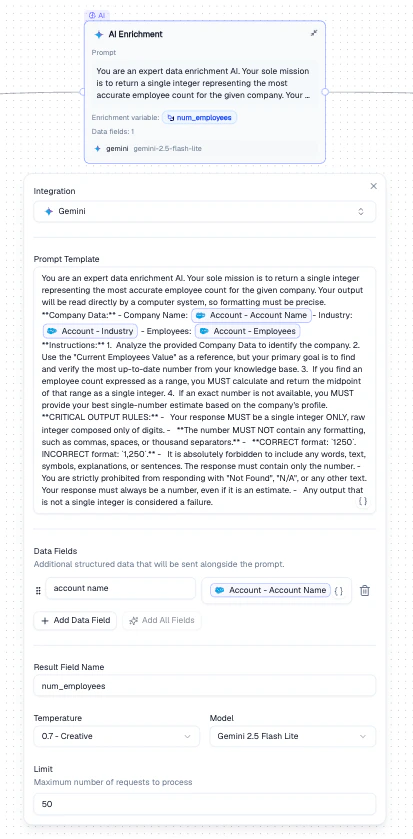
Sends each record through an LLM prompt to generate new data fields. Use it to classify records, extract insights, estimate values, or enrich records with AI-generated content.
 ## Configuration
| Setting | Description |
| --------------------- | ------------------------------------------------------------------------------------- |
| **Integration** | The LLM provider (Gemini, OpenAI, Anthropic) |
| **Prompt Template** | The instruction sent to the LLM. Use **Mentions** to inject record values dynamically |
| **Data Fields** | Additional structured data sent alongside the prompt |
| **Result Field Name** | The name of the output field that stores the LLM's response |
| **Temperature** | Controls response creativity (0 = deterministic, 1 = creative) |
| **Model** | The specific model to use (e.g., Gemini 2.5 Flash Lite) |
| **Limit** | Maximum number of requests to process |
## How It Works
Choose a provider, model, and temperature setting.
Write the instruction for the LLM. Use **Mentions** to inject record values (e.g., `{{Account Name}}`, `{{Industry}}`).
Choose a name for the output field where the LLM's response will be stored.
## Output
A new field (named by **Result Field Name**) is added to each record containing the LLM's response. This field becomes available as a **Mention** in all downstream nodes.
## Example
Enrich Salesforce Accounts with employee count estimates:
1. Set the prompt to instruct the LLM to return an employee count
2. Use Mentions to pass `Account Name`, `Industry`, and `Employees` as context
3. Set the result field to `num_employees`
4. The enriched field becomes available as a Mention in downstream nodes
## Best Practices
* Be specific in your prompt template - vague prompts produce inconsistent results
* Use low temperature (0–0.2) for factual extraction, higher for creative tasks
* Set a **Limit** when testing to avoid processing the entire dataset
* Include relevant context fields in **Data Fields** to improve LLM accuracy
## Related Nodes
* **[Data Normalization](/guide/nodes/transform/data-normalization-node)** - uses an LLM to clean existing fields rather than generating new ones
* **[Web Search](/guide/nodes/enrichment/web-search-node)** - enriches records with live web data instead of LLM-generated content
## Configuration
| Setting | Description |
| --------------------- | ------------------------------------------------------------------------------------- |
| **Integration** | The LLM provider (Gemini, OpenAI, Anthropic) |
| **Prompt Template** | The instruction sent to the LLM. Use **Mentions** to inject record values dynamically |
| **Data Fields** | Additional structured data sent alongside the prompt |
| **Result Field Name** | The name of the output field that stores the LLM's response |
| **Temperature** | Controls response creativity (0 = deterministic, 1 = creative) |
| **Model** | The specific model to use (e.g., Gemini 2.5 Flash Lite) |
| **Limit** | Maximum number of requests to process |
## How It Works
Choose a provider, model, and temperature setting.
Write the instruction for the LLM. Use **Mentions** to inject record values (e.g., `{{Account Name}}`, `{{Industry}}`).
Choose a name for the output field where the LLM's response will be stored.
## Output
A new field (named by **Result Field Name**) is added to each record containing the LLM's response. This field becomes available as a **Mention** in all downstream nodes.
## Example
Enrich Salesforce Accounts with employee count estimates:
1. Set the prompt to instruct the LLM to return an employee count
2. Use Mentions to pass `Account Name`, `Industry`, and `Employees` as context
3. Set the result field to `num_employees`
4. The enriched field becomes available as a Mention in downstream nodes
## Best Practices
* Be specific in your prompt template - vague prompts produce inconsistent results
* Use low temperature (0–0.2) for factual extraction, higher for creative tasks
* Set a **Limit** when testing to avoid processing the entire dataset
* Include relevant context fields in **Data Fields** to improve LLM accuracy
## Related Nodes
* **[Data Normalization](/guide/nodes/transform/data-normalization-node)** - uses an LLM to clean existing fields rather than generating new ones
* **[Web Search](/guide/nodes/enrichment/web-search-node)** - enriches records with live web data instead of LLM-generated content