> ## Documentation Index
> Fetch the complete documentation index at: https://docs.bondata.ai/llms.txt
> Use this file to discover all available pages before exploring further.
# Union Node
> Combine multiple datasets by stacking rows into a single table
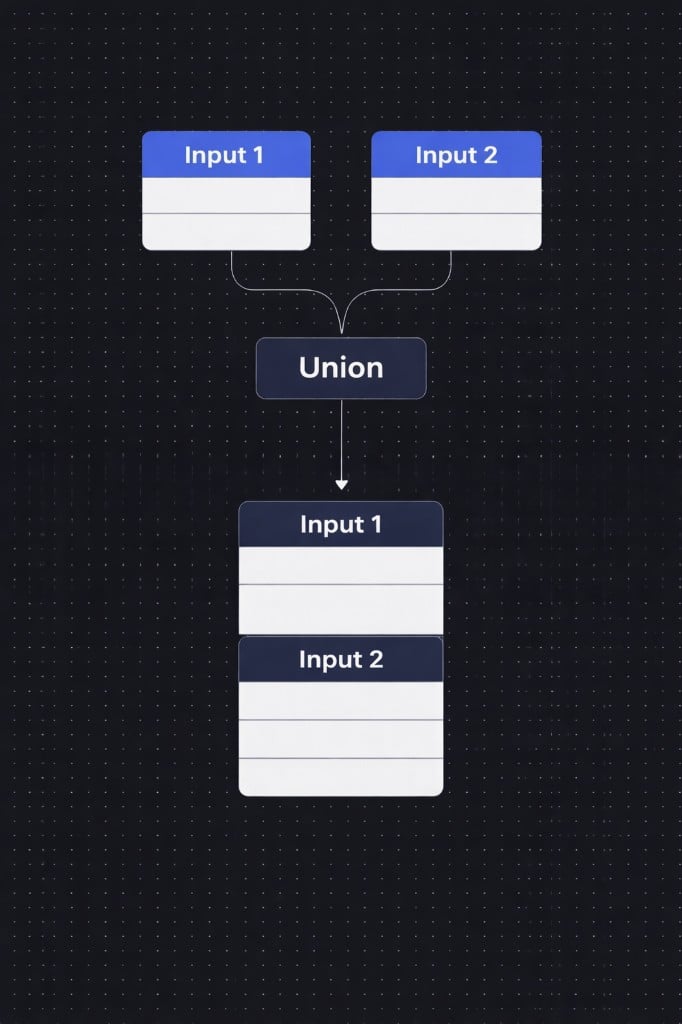
The Union node stacks rows from two data streams vertically into a single output - like appending one spreadsheet below another. Unlike Merge (which joins data side-by-side), Union appends data vertically. It can optionally deduplicate records based on mapped fields.
 ## Basic Example
**Input 1**
| ID | Name |
| -- | ---- |
| 1 | Dan |
| 2 | Yael |
**Input 2**
| ID | Name |
| -- | ---- |
| 3 | Ron |
| 4 | Noa |
**Result (Union)**
| ID | Name |
| -- | ---- |
| 1 | Dan |
| 2 | Yael |
| 3 | Ron |
| 4 | Noa |
## How it works
### Connect two inputs
Drag two data streams into the Union node. These can come from any upstream nodes in your workflow.
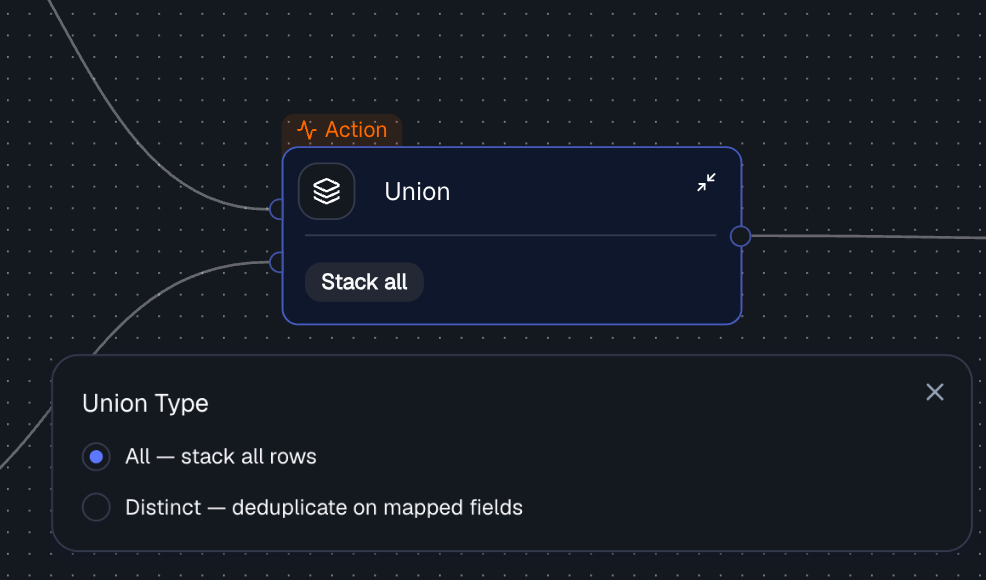
### Choose a union type
Select how the rows from both inputs should be combined.
| Union Type | SQL Equivalent | Description |
| ------------ | -------------- | ----------------------------------------------------------------------------------- |
| **All** | `UNION ALL` | Keep all rows from both inputs - simple concatenation (default) |
| **Distinct** | `UNION` | Deduplicate rows based on the mapped fields, keeping one row per unique combination |
## Basic Example
**Input 1**
| ID | Name |
| -- | ---- |
| 1 | Dan |
| 2 | Yael |
**Input 2**
| ID | Name |
| -- | ---- |
| 3 | Ron |
| 4 | Noa |
**Result (Union)**
| ID | Name |
| -- | ---- |
| 1 | Dan |
| 2 | Yael |
| 3 | Ron |
| 4 | Noa |
## How it works
### Connect two inputs
Drag two data streams into the Union node. These can come from any upstream nodes in your workflow.
### Choose a union type
Select how the rows from both inputs should be combined.
| Union Type | SQL Equivalent | Description |
| ------------ | -------------- | ----------------------------------------------------------------------------------- |
| **All** | `UNION ALL` | Keep all rows from both inputs - simple concatenation (default) |
| **Distinct** | `UNION` | Deduplicate rows based on the mapped fields, keeping one row per unique combination |
 ### Configure dedup settings (optional)
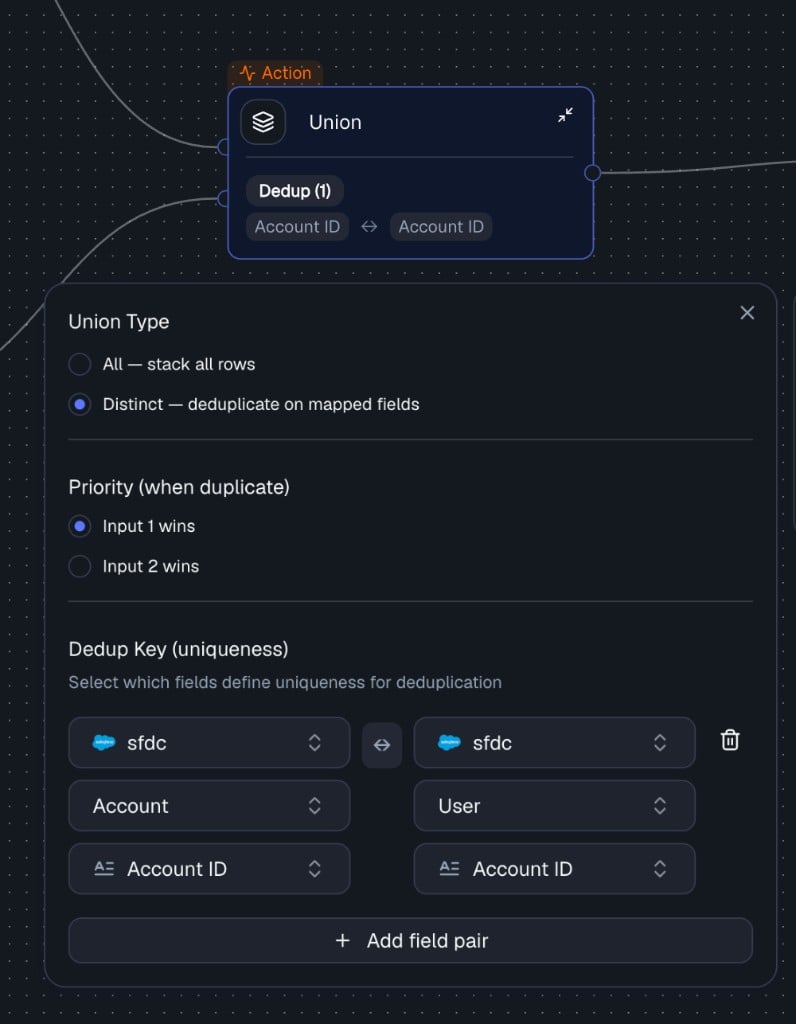
When using **Distinct** mode, configure which fields define uniqueness and which input wins on duplicates.
**Dedup Key** - select which fields from each input correspond to each other. These field pairs define uniqueness for deduplication. You can add multiple fields for a composite key (e.g., `ID` + `Date`).
| Setting | Description |
| ----------------- | --------------------------------------------------- |
| **Input 1 Field** | A field from the first data stream |
| **Input 2 Field** | The corresponding field from the second data stream |
**Priority** - when duplicates are found, controls which input's row is kept.
| Priority | Description |
| ---------------- | ------------------------------------------------------------- |
| **Input 1 wins** | Keep the row from Input 1 when a duplicate is found (default) |
| **Input 2 wins** | Keep the row from Input 2 when a duplicate is found |
### Configure dedup settings (optional)
When using **Distinct** mode, configure which fields define uniqueness and which input wins on duplicates.
**Dedup Key** - select which fields from each input correspond to each other. These field pairs define uniqueness for deduplication. You can add multiple fields for a composite key (e.g., `ID` + `Date`).
| Setting | Description |
| ----------------- | --------------------------------------------------- |
| **Input 1 Field** | A field from the first data stream |
| **Input 2 Field** | The corresponding field from the second data stream |
**Priority** - when duplicates are found, controls which input's row is kept.
| Priority | Description |
| ---------------- | ------------------------------------------------------------- |
| **Input 1 wins** | Keep the row from Input 1 when a duplicate is found (default) |
| **Input 2 wins** | Keep the row from Input 2 when a duplicate is found |
 Field mappings are required when using Distinct mode. In All mode they are optional - rows are simply stacked.
## Output
The Union node produces a single output stream containing the combined rows from both inputs. The output is available as an input to any downstream node in your workflow.
## Example with Deduplication
**Input 1**
| ID | Name |
| -- | ---- |
| 1 | Dan |
| 2 | Yael |
**Input 2**
| ID | Name |
| -- | ---- |
| 2 | Yael |
| 3 | Ron |
**Configuration:** Distinct, Dedup Key: `ID`, Priority: Input 1 wins
**Result:**
| ID | Name |
| -- | ---- |
| 1 | Dan |
| 2 | Yael |
| 3 | Ron |
## All vs Distinct
When using **All**, if both tables contain the same record, the result will include it **twice**:
| ID | Name |
| -- | ---- |
| 1 | Dan |
| 1 | Dan |
When using **Distinct**, duplicates are removed based on the dedup key, keeping only one row per unique combination.
## Union vs Merge vs Bond
| Feature | Bond | Merge | Union |
| ------------------ | -------------- | ------------------- | ------------------ |
| **Purpose** | Relate data | Combine columns | Stack rows |
| **Structure** | Linked | Flattened | Appended |
| **SQL Equivalent** | Join (logical) | Join (materialized) | UNION / UNION ALL |
| **Use Case** | Enrichment | Final dataset | Combining datasets |
## Best Practices
* Ensure inputs have compatible schemas (same fields and meaning)
* Use **All** when you want full data coverage and duplicates are acceptable
* Use **Distinct** when you need a clean dataset and duplicate records must be removed
* Carefully define dedup keys and priority rules
## Common Pitfalls
* **Mismatched columns** - same name but different meaning across inputs
* **Missing dedup key** - leads to incorrect duplicate removal
* **Over-aggressive deduplication** - can cause data loss
## Related Nodes
* **[Merge Node](/guide/nodes/combine/merge-node)** - joins two datasets side-by-side rather than stacking vertically
* **[Bond Node](/guide/nodes/combine/bond-node)** - creates logical relationships between entities
Field mappings are required when using Distinct mode. In All mode they are optional - rows are simply stacked.
## Output
The Union node produces a single output stream containing the combined rows from both inputs. The output is available as an input to any downstream node in your workflow.
## Example with Deduplication
**Input 1**
| ID | Name |
| -- | ---- |
| 1 | Dan |
| 2 | Yael |
**Input 2**
| ID | Name |
| -- | ---- |
| 2 | Yael |
| 3 | Ron |
**Configuration:** Distinct, Dedup Key: `ID`, Priority: Input 1 wins
**Result:**
| ID | Name |
| -- | ---- |
| 1 | Dan |
| 2 | Yael |
| 3 | Ron |
## All vs Distinct
When using **All**, if both tables contain the same record, the result will include it **twice**:
| ID | Name |
| -- | ---- |
| 1 | Dan |
| 1 | Dan |
When using **Distinct**, duplicates are removed based on the dedup key, keeping only one row per unique combination.
## Union vs Merge vs Bond
| Feature | Bond | Merge | Union |
| ------------------ | -------------- | ------------------- | ------------------ |
| **Purpose** | Relate data | Combine columns | Stack rows |
| **Structure** | Linked | Flattened | Appended |
| **SQL Equivalent** | Join (logical) | Join (materialized) | UNION / UNION ALL |
| **Use Case** | Enrichment | Final dataset | Combining datasets |
## Best Practices
* Ensure inputs have compatible schemas (same fields and meaning)
* Use **All** when you want full data coverage and duplicates are acceptable
* Use **Distinct** when you need a clean dataset and duplicate records must be removed
* Carefully define dedup keys and priority rules
## Common Pitfalls
* **Mismatched columns** - same name but different meaning across inputs
* **Missing dedup key** - leads to incorrect duplicate removal
* **Over-aggressive deduplication** - can cause data loss
## Related Nodes
* **[Merge Node](/guide/nodes/combine/merge-node)** - joins two datasets side-by-side rather than stacking vertically
* **[Bond Node](/guide/nodes/combine/bond-node)** - creates logical relationships between entities