> ## Documentation Index
> Fetch the complete documentation index at: https://docs.bondata.ai/llms.txt
> Use this file to discover all available pages before exploring further.
# Merge Node
> Combine two datasets into a single flattened table by aligning on shared fields
The Merge node combines two data streams in your workflow by matching records based on field values - similar to a join in SQL. While the Bond node creates relationships between entities, the Merge node produces a fully flattened dataset. Records that match are combined into a single row with fields from both inputs.
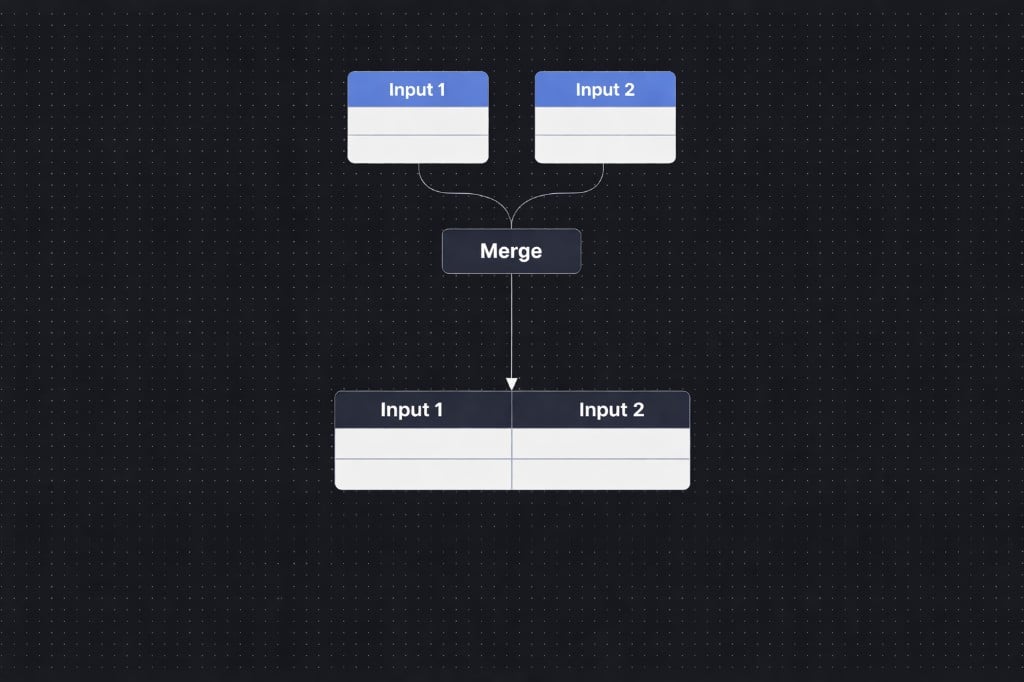 ## Basic Example
**Input 1**
| ID | Name |
| -- | ---- |
| 1 | Dan |
| 2 | Yael |
**Input 2**
| ID | Age |
| -- | --- |
| 1 | 30 |
| 2 | 25 |
**Result (Match field: ID)**
| ID | Name | Age |
| -- | ---- | --- |
| 1 | Dan | 30 |
| 2 | Yael | 25 |
## How it works
### Connect two inputs
Drag two data streams into the Merge node. These can come from any upstream nodes in your workflow - Get Data, Filter, another Merge, etc.
### Choose the match fields
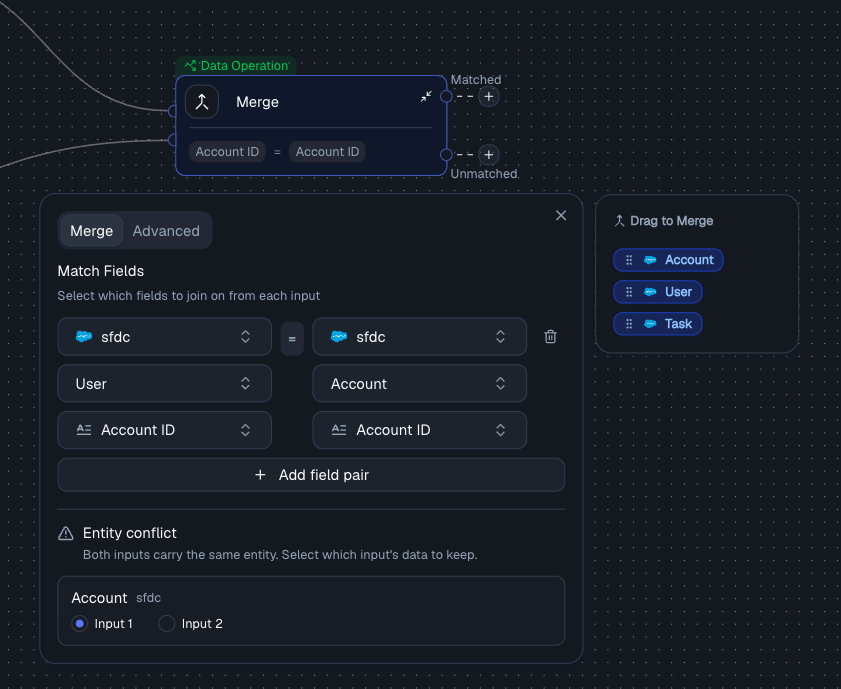
Specify which fields to join on between the two inputs (e.g., Account ID from Input 1 = Account ID from Input 2). You can add multiple field pairs to create a composite key - records must match on **all** mapped fields.
| Setting | Description |
| ----------------- | ------------------------------------------------- |
| **Input 1 Field** | The field from the first data stream to match on |
| **Input 2 Field** | The field from the second data stream to match on |
## Basic Example
**Input 1**
| ID | Name |
| -- | ---- |
| 1 | Dan |
| 2 | Yael |
**Input 2**
| ID | Age |
| -- | --- |
| 1 | 30 |
| 2 | 25 |
**Result (Match field: ID)**
| ID | Name | Age |
| -- | ---- | --- |
| 1 | Dan | 30 |
| 2 | Yael | 25 |
## How it works
### Connect two inputs
Drag two data streams into the Merge node. These can come from any upstream nodes in your workflow - Get Data, Filter, another Merge, etc.
### Choose the match fields
Specify which fields to join on between the two inputs (e.g., Account ID from Input 1 = Account ID from Input 2). You can add multiple field pairs to create a composite key - records must match on **all** mapped fields.
| Setting | Description |
| ----------------- | ------------------------------------------------- |
| **Input 1 Field** | The field from the first data stream to match on |
| **Input 2 Field** | The field from the second data stream to match on |
 ### Resolve conflicts
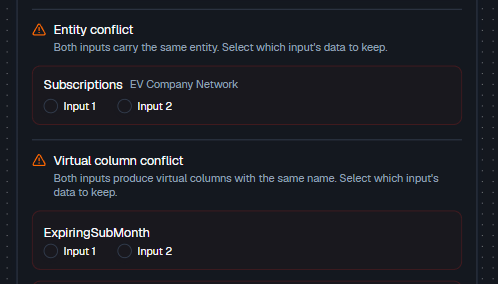
If both inputs carry the same entity, pick whether to keep the data from **Input 1** or **Input 2**.
| Setting | Description |
| ----------------------- | -------------------------------------------------------------------------------------------------------------------------------------------------------- |
| **Entity Preferences** | Per-entity setting that controls which input's columns to keep when both inputs carry the same entity |
| **Virtual Preferences** | Per-virtual-column setting that controls which input's data to keep when both inputs carry the same virtual column. Defaults to Input 1 if not specified |
### Resolve conflicts
If both inputs carry the same entity, pick whether to keep the data from **Input 1** or **Input 2**.
| Setting | Description |
| ----------------------- | -------------------------------------------------------------------------------------------------------------------------------------------------------- |
| **Entity Preferences** | Per-entity setting that controls which input's columns to keep when both inputs carry the same entity |
| **Virtual Preferences** | Per-virtual-column setting that controls which input's data to keep when both inputs carry the same virtual column. Defaults to Input 1 if not specified |
 ### Choose a join type (optional)
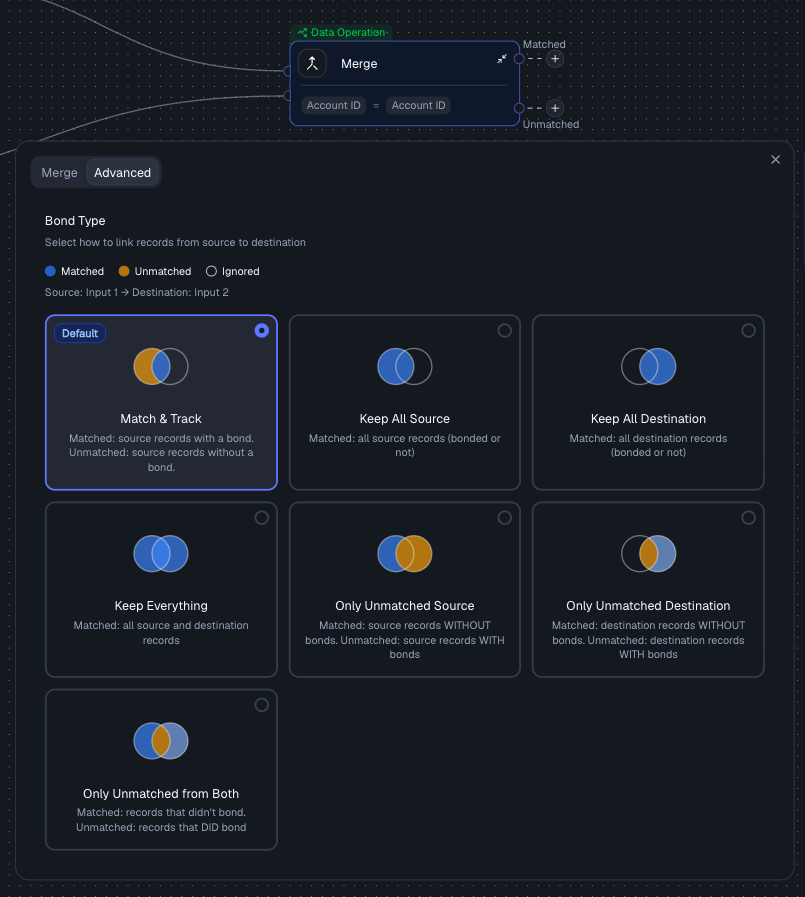
Under the **Advanced** tab, select a join type to control which records appear in the output. The default is **Match & Track**.
| Join Type | SQL Equivalent | Description |
| ------------------------------ | --------------- | ------------------------------------------------------------- |
| **Match & Track** | Inner Join | Only records with matches in both inputs (default) |
| **Keep All Source** | Left Join | All records from Input 1, matched with Input 2 where possible |
| **Keep All Destination** | Right Join | All records from Input 2, matched with Input 1 where possible |
| **Keep Everything** | Full Outer Join | All records from both inputs, matched where possible |
| **Only Unmatched Source** | Left Excluding | Only Input 1 records that have **no** match in Input 2 |
| **Only Unmatched Destination** | Right Excluding | Only Input 2 records that have **no** match in Input 1 |
| **Only Unmatched from Both** | Full Excluding | Records from either input that have **no** match in the other |
### Choose a join type (optional)
Under the **Advanced** tab, select a join type to control which records appear in the output. The default is **Match & Track**.
| Join Type | SQL Equivalent | Description |
| ------------------------------ | --------------- | ------------------------------------------------------------- |
| **Match & Track** | Inner Join | Only records with matches in both inputs (default) |
| **Keep All Source** | Left Join | All records from Input 1, matched with Input 2 where possible |
| **Keep All Destination** | Right Join | All records from Input 2, matched with Input 1 where possible |
| **Keep Everything** | Full Outer Join | All records from both inputs, matched where possible |
| **Only Unmatched Source** | Left Excluding | Only Input 1 records that have **no** match in Input 2 |
| **Only Unmatched Destination** | Right Excluding | Only Input 2 records that have **no** match in Input 1 |
| **Only Unmatched from Both** | Full Excluding | Records from either input that have **no** match in the other |
 The Merge node joins two data streams that are already flowing through your workflow. To pull in new data from a connected integration based on a Bond, use the Get Data node instead.
## Output
The Merge node produces two output streams:
| Output | Description |
| ------------- | ------------------------------------------------------ |
| **Matched** | Records that successfully joined across the two inputs |
| **Unmatched** | Records that did not find a match in the other input |
Both outputs are available as inputs to downstream nodes in your workflow.
## Example with join types
**Input 1 (Subscriptions)**
| ID | Name |
| -- | ---- |
| 1 | Dan |
| 2 | Yael |
| 3 | Noa |
**Input 2 (Ages)**
| ID | Age |
| -- | --- |
| 1 | 30 |
| 2 | 25 |
**Match Field:** `ID`
### Match & Track (Inner Join)
**Matched:**
| ID | Name | Age |
| -- | ---- | --- |
| 1 | Dan | 30 |
| 2 | Yael | 25 |
**Unmatched:**
| ID | Name |
| -- | ---- |
| 3 | Noa |
### Keep All Source (Left Join)
| ID | Name | Age |
| -- | ---- | ---- |
| 1 | Dan | 30 |
| 2 | Yael | 25 |
| 3 | Noa | null |
### Keep Everything (Full Outer Join)
| ID | Name | Age |
| -- | ---- | ---- |
| 1 | Dan | 30 |
| 2 | Yael | 25 |
| 3 | Noa | null |
(+ any unmatched from Input 2 if present)
## Merge vs Bond
| Feature | Bond | Merge |
| ------------ | ------------------------ | -------------------------- |
| **Purpose** | Create relationships | Combine datasets |
| **Output** | Linked records | Flattened table |
| **Behavior** | Join-like (logical) | Join + materialize |
| **Use case** | Enrichment & exploration | Final dataset construction |
## Best Practices
* Always verify your match fields - IDs should align exactly
* Use multiple fields if a single key is not unique
* Resolve conflicts intentionally - don't default blindly
* Check **Unmatched** output to catch missing data
* Choose merge mode based on your goal:
* **Analysis** → Keep Everything
* **Clean dataset** → Match & Track
* **Debugging** → Unmatched modes
## Related Nodes
* **[Bond Node](/guide/nodes/combine/bond-node)** - creates logical relationships between entities rather than producing a flattened table
* **[Union Node](/guide/nodes/combine/union-node)** - stacks rows vertically instead of joining side-by-side
The Merge node joins two data streams that are already flowing through your workflow. To pull in new data from a connected integration based on a Bond, use the Get Data node instead.
## Output
The Merge node produces two output streams:
| Output | Description |
| ------------- | ------------------------------------------------------ |
| **Matched** | Records that successfully joined across the two inputs |
| **Unmatched** | Records that did not find a match in the other input |
Both outputs are available as inputs to downstream nodes in your workflow.
## Example with join types
**Input 1 (Subscriptions)**
| ID | Name |
| -- | ---- |
| 1 | Dan |
| 2 | Yael |
| 3 | Noa |
**Input 2 (Ages)**
| ID | Age |
| -- | --- |
| 1 | 30 |
| 2 | 25 |
**Match Field:** `ID`
### Match & Track (Inner Join)
**Matched:**
| ID | Name | Age |
| -- | ---- | --- |
| 1 | Dan | 30 |
| 2 | Yael | 25 |
**Unmatched:**
| ID | Name |
| -- | ---- |
| 3 | Noa |
### Keep All Source (Left Join)
| ID | Name | Age |
| -- | ---- | ---- |
| 1 | Dan | 30 |
| 2 | Yael | 25 |
| 3 | Noa | null |
### Keep Everything (Full Outer Join)
| ID | Name | Age |
| -- | ---- | ---- |
| 1 | Dan | 30 |
| 2 | Yael | 25 |
| 3 | Noa | null |
(+ any unmatched from Input 2 if present)
## Merge vs Bond
| Feature | Bond | Merge |
| ------------ | ------------------------ | -------------------------- |
| **Purpose** | Create relationships | Combine datasets |
| **Output** | Linked records | Flattened table |
| **Behavior** | Join-like (logical) | Join + materialize |
| **Use case** | Enrichment & exploration | Final dataset construction |
## Best Practices
* Always verify your match fields - IDs should align exactly
* Use multiple fields if a single key is not unique
* Resolve conflicts intentionally - don't default blindly
* Check **Unmatched** output to catch missing data
* Choose merge mode based on your goal:
* **Analysis** → Keep Everything
* **Clean dataset** → Match & Track
* **Debugging** → Unmatched modes
## Related Nodes
* **[Bond Node](/guide/nodes/combine/bond-node)** - creates logical relationships between entities rather than producing a flattened table
* **[Union Node](/guide/nodes/combine/union-node)** - stacks rows vertically instead of joining side-by-side