> ## Documentation Index
> Fetch the complete documentation index at: https://docs.bondata.ai/llms.txt
> Use this file to discover all available pages before exploring further.
# Bond Node
> Combine data across entities by creating relationships based on shared keys
The Bond node is a powerful tool for combining data across entities. It works similarly to a join operation in SQL, allowing you to relate two datasets based on a shared key.
## What is a Bond?
A Bond creates a relationship between two entities by matching fields that represent the same identifier.
It:
* Connects two entities (e.g., Subscriptions and Charge Stations)
* Matches them using a shared field (e.g., Charge Station ID)
* Produces a virtual, in-memory table combining both datasets
## Core Concept: Matched vs Unmatched
When a Bond runs, every record falls into one of two categories:
* **Matched** - records where a relationship was successfully found
* **Unmatched** - records where no corresponding match exists
This distinction is central to how the Bond behaves and what data is passed downstream.
## How It Works
In the UI:
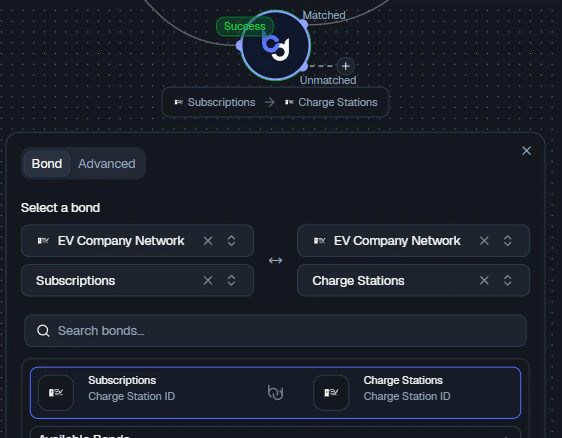
1. **Select two entities:**
* Source (left): e.g., Subscriptions
* Destination (right): e.g., Charge Stations
2. **Define the relationship:**
* `Subscriptions.Charge Station ID` ↔ `Charge Stations.Charge Station ID`
3. The Bond evaluates all records and splits them into:
* Matched pairs
* Unmatched records (from either side)
If you are not seeing the Bond you are after, you can create it by clicking **+ Create Custom Bond**.
 ## Bond Outputs
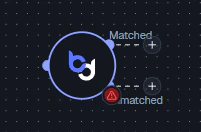
The Bond node exposes multiple outputs:
* **Matched** → records that successfully joined
* **Unmatched** → records that did not find a match
## Bond Outputs
The Bond node exposes multiple outputs:
* **Matched** → records that successfully joined
* **Unmatched** → records that did not find a match
 This allows you to:
* Continue analysis on valid relationships
* Investigate missing or inconsistent data separately
## Advanced: Controlling Match Behavior
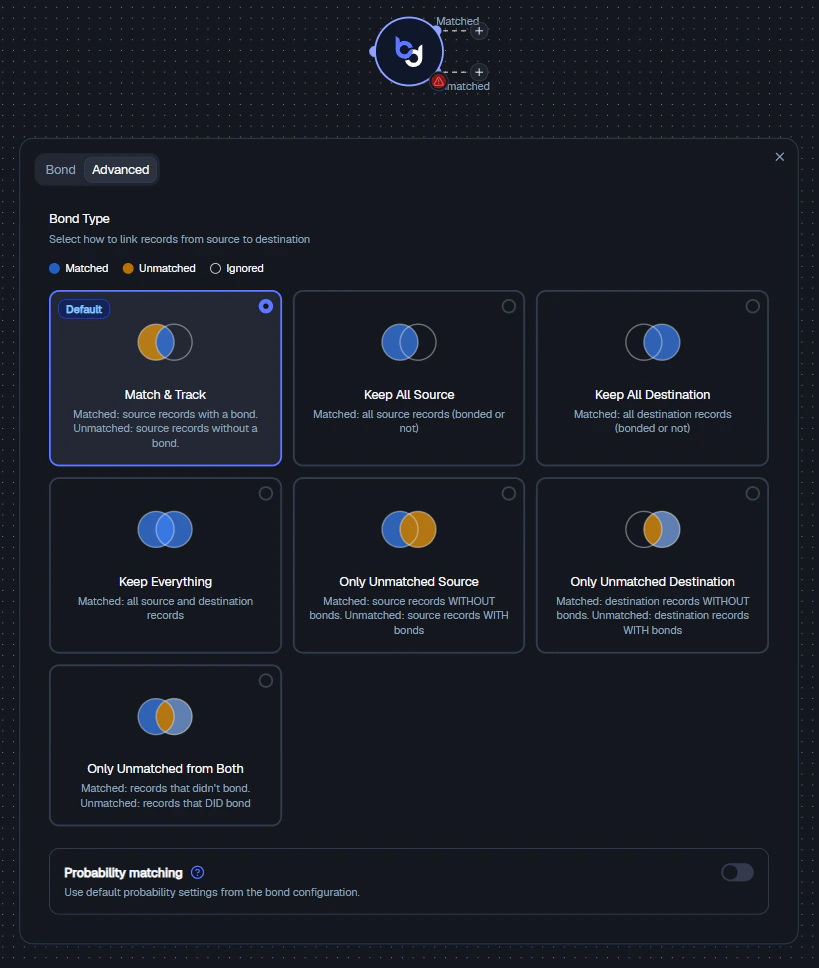
In the **Advanced** tab, you can define exactly how matched and unmatched records are handled.
This allows you to:
* Continue analysis on valid relationships
* Investigate missing or inconsistent data separately
## Advanced: Controlling Match Behavior
In the **Advanced** tab, you can define exactly how matched and unmatched records are handled.
 ### 1. Match & Track (Default)
* **Matched:** Source records with a bond
* **Unmatched:** Source records without a bond
Best for standard enrichment use cases and tracking which source records failed to match.
### 2. Keep All Source
Keeps all source records, regardless of match. Destination data is added when available.
Equivalent to a **Left Join** in SQL.
### 3. Keep All Destination
Keeps all destination records, regardless of match.
Equivalent to a **Right Join** in SQL.
### 4. Keep Everything
Keeps all records from both sides.
Equivalent to a **Full Outer Join** in SQL.
### 5. Only Unmatched Source
Returns source records without matches. Useful for finding missing relationships and data quality checks.
### 6. Only Unmatched Destination
Returns destination records without matches. Useful for identifying unused or orphaned entities.
### 7. Only Unmatched from Both
Focuses strictly on mismatches - records that failed to bond across both sides. Best for debugging joins and auditing data consistency.
### When to Use Each Mode
| Goal | Recommended Mode |
| -------------------------- | -------------------------- |
| Standard enrichment | Match & Track |
| Keep all subscriptions | Keep All Source |
| Analyze all data | Keep Everything |
| Find missing links | Only Unmatched Source |
| Audit destination coverage | Only Unmatched Destination |
## Probability Matching (Optional)
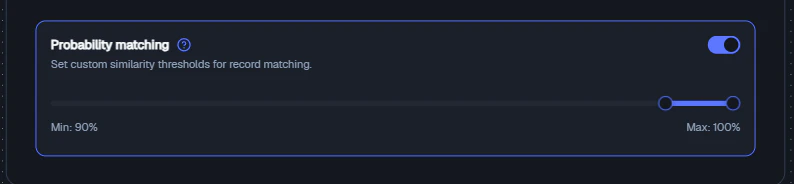
The **Probability Matching** toggle allows the Bond to use probabilistic logic:
* Instead of exact matches, it can match records based on similarity using scoring thresholds
* Useful for fuzzy matching (e.g., names, partial IDs) and imperfect or inconsistent datasets
* If disabled, only exact matches are considered
### 1. Match & Track (Default)
* **Matched:** Source records with a bond
* **Unmatched:** Source records without a bond
Best for standard enrichment use cases and tracking which source records failed to match.
### 2. Keep All Source
Keeps all source records, regardless of match. Destination data is added when available.
Equivalent to a **Left Join** in SQL.
### 3. Keep All Destination
Keeps all destination records, regardless of match.
Equivalent to a **Right Join** in SQL.
### 4. Keep Everything
Keeps all records from both sides.
Equivalent to a **Full Outer Join** in SQL.
### 5. Only Unmatched Source
Returns source records without matches. Useful for finding missing relationships and data quality checks.
### 6. Only Unmatched Destination
Returns destination records without matches. Useful for identifying unused or orphaned entities.
### 7. Only Unmatched from Both
Focuses strictly on mismatches - records that failed to bond across both sides. Best for debugging joins and auditing data consistency.
### When to Use Each Mode
| Goal | Recommended Mode |
| -------------------------- | -------------------------- |
| Standard enrichment | Match & Track |
| Keep all subscriptions | Keep All Source |
| Analyze all data | Keep Everything |
| Find missing links | Only Unmatched Source |
| Audit destination coverage | Only Unmatched Destination |
## Probability Matching (Optional)
The **Probability Matching** toggle allows the Bond to use probabilistic logic:
* Instead of exact matches, it can match records based on similarity using scoring thresholds
* Useful for fuzzy matching (e.g., names, partial IDs) and imperfect or inconsistent datasets
* If disabled, only exact matches are considered
 ## Example
### Scenario
You want to enrich subscriptions with charge station data.
### Configuration
* **Source:** Subscriptions
* **Destination:** Charge Stations
* **Match:** Charge Station ID
### Result
* **Matched output:** Subscriptions with valid charge station info
* **Unmatched output:** Subscriptions missing or referencing invalid stations
## Best Practices
* Use **Matched** output for primary workflows
* Use **Unmatched** output for debugging and QA
* Choose join behavior intentionally - don't default blindly
* Validate key fields (IDs should align in format and meaning)
* Use probability matching only when necessary
## Related Nodes
* **[Merge Node](/guide/nodes/combine/merge-node)** - joins two datasets side-by-side into a flattened table, rather than creating entity relationships
* **[Union Node](/guide/nodes/combine/union-node)** - stacks rows vertically instead of combining columns
## Example
### Scenario
You want to enrich subscriptions with charge station data.
### Configuration
* **Source:** Subscriptions
* **Destination:** Charge Stations
* **Match:** Charge Station ID
### Result
* **Matched output:** Subscriptions with valid charge station info
* **Unmatched output:** Subscriptions missing or referencing invalid stations
## Best Practices
* Use **Matched** output for primary workflows
* Use **Unmatched** output for debugging and QA
* Choose join behavior intentionally - don't default blindly
* Validate key fields (IDs should align in format and meaning)
* Use probability matching only when necessary
## Related Nodes
* **[Merge Node](/guide/nodes/combine/merge-node)** - joins two datasets side-by-side into a flattened table, rather than creating entity relationships
* **[Union Node](/guide/nodes/combine/union-node)** - stacks rows vertically instead of combining columns