> ## Documentation Index
> Fetch the complete documentation index at: https://docs.bondata.ai/llms.txt
> Use this file to discover all available pages before exploring further.
# Update Record
> Write enriched or computed values back to records in a connected integration
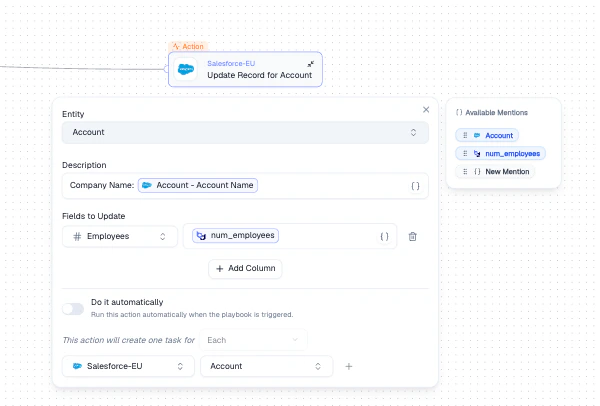
Writes data back to a connected integration. Use it to update existing records with enriched, normalized, or computed values.
 ## Configuration
| Setting | Description |
| ----------------------- | ------------------------------------------------------------------------------- |
| **Entity** | The target entity to update (e.g., Salesforce Account) |
| **Description** | A human-readable summary using Mentions (shown in task logs) |
| **Fields to Update** | Map target fields to source values using Mentions |
| **Do it automatically** | Toggle to execute immediately when the Agent runs, or queue for manual approval |
## How It Works
Choose which entity's records to update in the connected integration.
Use **+ Add Column** to add field mappings. For each field, select the target field and use **Mentions** to set the value from upstream data.
Toggle **Do it automatically** to execute immediately, or leave it off to queue tasks for manual approval.
## Output
Each matched record creates one task. Tasks are visible in the Agent's task log after execution.
## Best Practices
* Start with **manual approval** to verify updates before enabling automatic execution
* Use a clear **Description** with Mentions so task logs are easy to scan
* Map only the fields that need updating - avoid overwriting unchanged data
## Related Nodes
* **[Create Record](/guide/nodes/actions/create-record-node)** - creates new records instead of updating existing ones
* **[Get Data](/guide/nodes/data/get-data-node)** - fetches the records that Update Record will modify
## Configuration
| Setting | Description |
| ----------------------- | ------------------------------------------------------------------------------- |
| **Entity** | The target entity to update (e.g., Salesforce Account) |
| **Description** | A human-readable summary using Mentions (shown in task logs) |
| **Fields to Update** | Map target fields to source values using Mentions |
| **Do it automatically** | Toggle to execute immediately when the Agent runs, or queue for manual approval |
## How It Works
Choose which entity's records to update in the connected integration.
Use **+ Add Column** to add field mappings. For each field, select the target field and use **Mentions** to set the value from upstream data.
Toggle **Do it automatically** to execute immediately, or leave it off to queue tasks for manual approval.
## Output
Each matched record creates one task. Tasks are visible in the Agent's task log after execution.
## Best Practices
* Start with **manual approval** to verify updates before enabling automatic execution
* Use a clear **Description** with Mentions so task logs are easy to scan
* Map only the fields that need updating - avoid overwriting unchanged data
## Related Nodes
* **[Create Record](/guide/nodes/actions/create-record-node)** - creates new records instead of updating existing ones
* **[Get Data](/guide/nodes/data/get-data-node)** - fetches the records that Update Record will modify