> ## Documentation Index
> Fetch the complete documentation index at: https://docs.bondata.ai/llms.txt
> Use this file to discover all available pages before exploring further.
# Private Export
> Export matching records to a downloadable file in your private storage
Exports matching records to a downloadable file in your private storage. Useful for generating reports, sharing data snapshots, or archiving results.
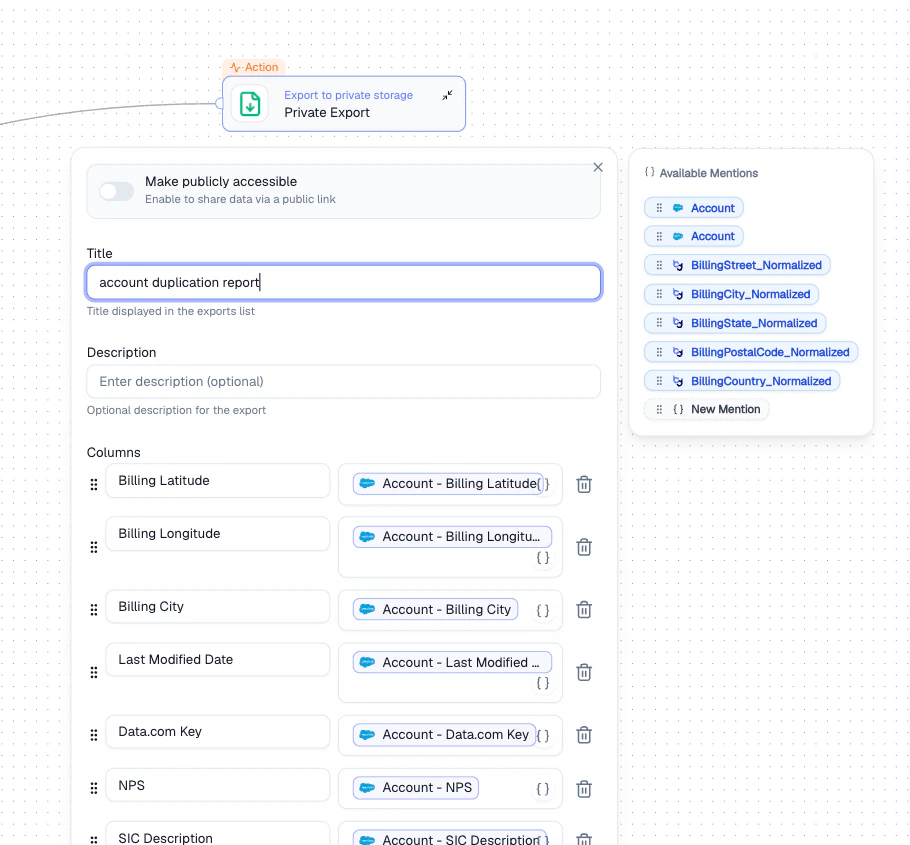 ## Configuration
| Setting | Description |
| ---------------------------- | ---------------------------------------------------------------------------------- |
| **Make publicly accessible** | Toggle to generate a shareable public link |
| **Title** | Display name in the Exports list |
| **Description** | Optional context for the export |
| **Columns** | Select which fields to include. Use Mentions to pull values from any upstream node |
## How It Works
Set a title and optional description for easy identification.
Choose which fields to include using **Mentions** to reference upstream data.
Toggle **Make publicly accessible** if you need a shareable link.
## Output
Exports are available under **Exports** in the sidebar after the Agent runs.
## Best Practices
* Include only the columns needed to keep exports clean and focused
* Use descriptive titles so exports are easy to find later
* Only enable public access when sharing externally is necessary
## Related Nodes
* **[Export to CSV](/guide/nodes/actions/export-csv-node)** - exports data to a CSV file or Google Sheet
* **[Upload File](/guide/nodes/actions/upload-file-node)** - uploads files to a connected cloud storage integration
## Configuration
| Setting | Description |
| ---------------------------- | ---------------------------------------------------------------------------------- |
| **Make publicly accessible** | Toggle to generate a shareable public link |
| **Title** | Display name in the Exports list |
| **Description** | Optional context for the export |
| **Columns** | Select which fields to include. Use Mentions to pull values from any upstream node |
## How It Works
Set a title and optional description for easy identification.
Choose which fields to include using **Mentions** to reference upstream data.
Toggle **Make publicly accessible** if you need a shareable link.
## Output
Exports are available under **Exports** in the sidebar after the Agent runs.
## Best Practices
* Include only the columns needed to keep exports clean and focused
* Use descriptive titles so exports are easy to find later
* Only enable public access when sharing externally is necessary
## Related Nodes
* **[Export to CSV](/guide/nodes/actions/export-csv-node)** - exports data to a CSV file or Google Sheet
* **[Upload File](/guide/nodes/actions/upload-file-node)** - uploads files to a connected cloud storage integration